
Redragon SS-552 Ragnaros Review: More Than Just a Budget Stream Deck Alternative
Quick Summary
The Redragon SS-552 Ragnaros is one of those devices that initially looks easy to categorize. At first glance, it appears to be another budget-friendly Stream Deck alternative aimed mainly at streamers and content creators.
After spending real time with it, though, I think that description undersells what it actually is.
Yes, it works as a stream controller. But it also works surprisingly well as a desktop command center, media controller, productivity tool, automation pad, and general-purpose shortcut system. The combination of LCD buttons, rotary knobs, and a touch strip gives it more flexibility than a lot of cheaper macro pads that only focus on buttons alone.
The biggest surprise for me was not the hardware. It was realizing how much potential the platform has once you start customizing it beyond the stock setup.
What Is the Redragon SS-552?
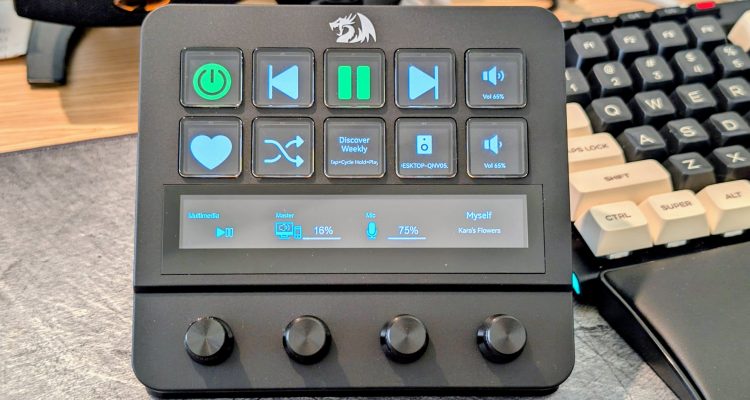
The Redragon SS-552, also sold as the SS552 Stream Controller or Ragnaros SS-552, is a programmable desktop controller with:
- 10 customizable LCD buttons
- 4 rotary knobs
- 1 touch strip
- USB-C connectivity
The idea is simple: instead of constantly navigating menus, keyboard shortcuts, or software panels, you move common tasks onto dedicated physical controls.
That can mean:
- OBS scene switching
- music controls
- launching apps
- triggering macros
- controlling meetings
- running scripts
- switching audio devices
- smart-home controls
- productivity shortcuts
- or just making your desk workflow cleaner
The LCD buttons are especially important because they let every key visually change depending on what profile or app you are using. That makes the device much easier to understand at a glance compared with traditional macro pads where you eventually forget what half the buttons do.
The rotary knobs add another layer of flexibility that a button-only design cannot really match. Buttons are good for yes/no actions. Knobs are better for continuous control like volume, brightness, zoom, scrolling, or scrubbing through media.
Interested in the Redragon SS552 Stream Controller?
Save 10% when you purchase directly from Redragon.
Affiliate link — I may earn a commission from qualifying purchases at no additional cost to you.
Key Specs
| Feature | Redragon SS-552 Ragnaros |
|---|---|
| Device type | Stream controller / macro pad |
| LCD buttons | 10 |
| Rotary knobs | 4 |
| Touch strip | 1 |
| Connection | USB-C |
| Compatibility | Windows and macOS |
| Supported software examples | OBS, Streamlabs, Premiere Pro, Photoshop |
| Custom icons | JPG, PNG, GIF support |
| Built-in features | Clock, weather, calendar, music controls |
The hardware sits in an interesting middle ground. It is clearly more capable than a basic macro keypad, but it is still far more affordable than some of the premium stream controller ecosystems.
Design and Build Quality
The layout itself is smart.
The LCD keys sit in a 2-by-5 grid on top, while the touch strip and knobs sit underneath. That separation makes the device feel organized instead of cluttered. The visual actions stay up top while the more analog-style controls stay below.
The adjustable stand also matters more than it sounds. Stream controllers only work well if you can comfortably see and reach them. The SS-552 angles nicely beside a keyboard without feeling awkward.
As for build quality, the device actually feels sturdier than I expected from the price category. The knobs feel solid, the LCD keys look surprisingly good once customized, and the overall unit does not feel cheap sitting on the desk.
That said, one thing I do wonder about long term is how the design will hold up under heavy use.
Because of the angled stand and lightweight design, the unit can move slightly when pressing buttons quickly. During normal desktop use, that is not really an issue. But during fast-paced gaming sessions where someone is hammering buttons repeatedly, I could see it potentially taking more physical stress over time.
I am not saying it feels fragile. It actually feels fairly solid overall. I just think durability under years of aggressive use is probably one of the bigger long-term questions for this style of device.
One feature that would absolutely push this hardware to another level would be wireless support.
Right now, the SS-552 is tied to the desk through USB-C. If it supported wireless connectivity, it would suddenly become much more flexible for whole-home media control, smart-home control, or portable setups. I would love to be able to pick it up, walk into another room, and continue controlling Spotify playback or smart devices without bringing a laptop with it.
Setup and Software Experience
This is the part where expectations matter.
The SS-552 depends heavily on Redragon’s StreamDock software. That means the overall experience lives or dies based on software flexibility and plugin support.
The good news is that I think people sometimes underestimate what Redragon already includes out of the box.
The default plugin selection is actually pretty decent.
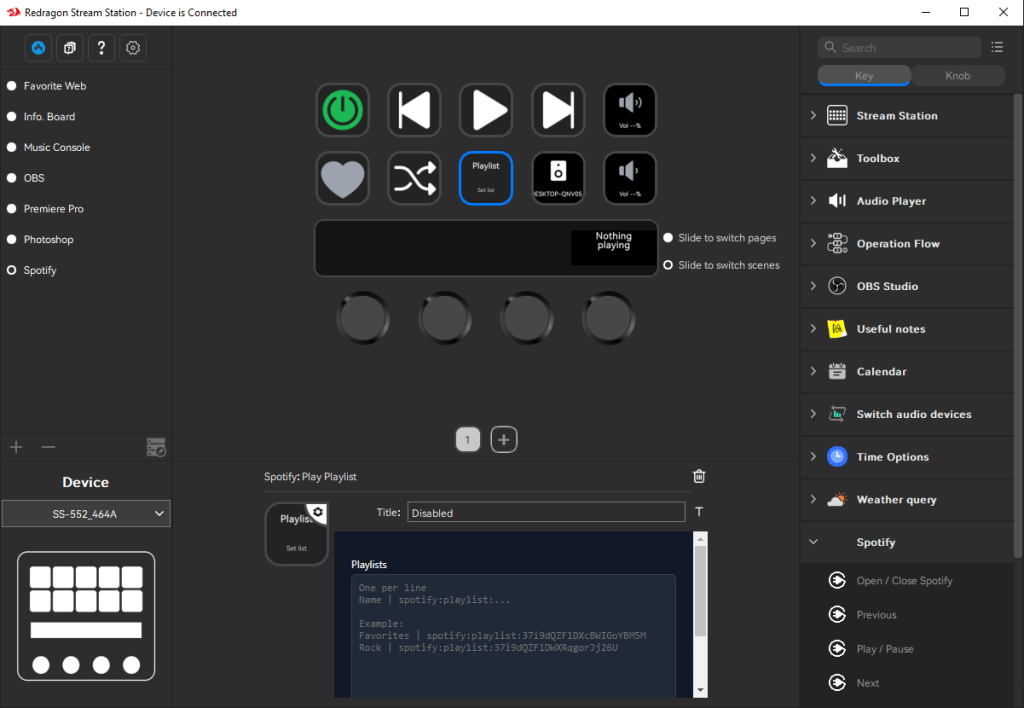
Mine shipped pre-configured with categories and layouts for:
- Favorite Websites
- Info Board
- Music Console
- OBS
- Premiere Pro
- Photoshop
That immediately makes the device feel more approachable because you are not starting from a completely blank slate.
The default Music Console in particular was better than I expected. It already supported Spotify playback controls and basic media handling without needing custom development.
Where things started getting limited for me was deeper Spotify functionality:
- playlist handling
- liking songs
- Spotify Connect device switching
- controlling non-PC playback devices
- advanced volume handling
- now-playing behavior
That is where I eventually started building my own plugin.
But I do not want to give the impression that the stock experience is bad. It actually is not. For many users, the included functionality will probably already cover most everyday needs.
Building a Better Spotify Experience
One thing I realized fairly quickly while using the SS-552 was that the hardware itself was not really the limitation. The bigger limitation was the surrounding ecosystem.
The included StreamDock software works well enough for shortcuts, launching apps, media keys, and macros, but once you start imagining more advanced workflows, you eventually run into limits.
I wanted something that behaved more like a dedicated Spotify control surface instead of just another macro keypad pretending to be one.
That eventually turned into a side project: building a custom Spotify plugin specifically for the SS-552.
At first, the goal was simple:
- proper play/pause
- next/previous track
- now-playing display
But once I started digging into Spotify’s API and the StreamDock plugin system, the project evolved into something much more capable.
The plugin now supports:
- Play/pause, previous, and next track
- Shuffle toggle
- Like/unlike current song
- Playlist cycling with hold-to-play behavior
- Spotify Connect device switching
- Active device volume control
- Now-playing information directly on the LCD keys
- Support for Spotify Connect devices outside the PC itself, including WiiM streamers and smart speakers
The device-switching functionality ended up being one of my favorite parts. Being able to move playback between my desktop, a WiiM streamer, and other Spotify devices directly from the SS-552 changed the way I used the controller day to day.
The volume controls became significantly more useful once they controlled the active Spotify playback device instead of only Windows desktop volume.
At that point, the SS-552 stopped feeling like a generic macro pad and started feeling more like a customizable desktop audio console.
The most interesting realization through all of this was that the hardware already had enough capability. What it really needed was software designed around real workflows instead of generic shortcuts.
That is why I think the SS-552 platform has more long-term potential than people might initially assume.
Here is a link to the plugin on GitHub if you would like to use it: sonicj/redragon-ss552-spotify-control
Screenshot
Streaming Use Cases
The obvious target audience is streamers, and the SS-552 makes a lot of sense there.
Useful streaming actions include:
- OBS scene switching
- starting/stopping recording
- muting microphones
- toggling overlays
- posting chat messages
- controlling music
- launching browser sources
The advantage is not just speed. It is reducing mistakes while live.
A clearly labeled physical button is much easier to trust under pressure than digging through software windows during a stream.
The knobs also fit naturally into streaming workflows:
- mic volume
- music volume
- headphone levels
- app-specific controls
The overall hardware layout feels well thought out for this kind of use.
Gaming Use Cases
For gaming, the SS-552 works best as a companion device rather than a replacement for traditional controls.
Useful gaming-related tasks could include:
- launching games
- muting Discord
- starting recording
- switching audio outputs
- controlling Spotify
- opening guides or maps
- triggering macros
One thing I specifically want to test further is how well the SS-552 works with Age of Empires II.
I suspect RTS games may actually be one of the more interesting use cases for a device like this because of how many repetitive commands, build orders, overlays, and utility actions can benefit from dedicated buttons.
Age of Empires II Testing
I created a dedicated AOE2 layout/profile with two pages of macros and frequently used hotkeys. Honestly, this is the kind of game where you could easily build several pages of macros depending on how deep you want to go.
The best use case for the SS-552 is combining multiple actions into a single button press. For example, I created one button that selects all Town Centers and queues five villagers in each. Normally, that would require several hotkeys and/or mouse clicks, but here it is reduced to a single press.
Setup can be time-consuming, much like most devices in this category (and I have definitely worked with worse), but once everything is configured, you rarely need to touch it again.
Pleasantly surprised is how I would describe my response to how responsive the buttons felt and how consistently the macros executed exactly as configured.
I also created the files needed for custom AOE2 icons to work with the SS-552 and uploaded them here for others to use. I named the ZIP file so that if you extract it to:
C:\Users\USER_NAME\AppData\Roaming\HotSpot\StreamDock\icons\
(replacing USER_NAME with your Windows username), the icons should immediately appear in the SS-552 software.
Here is the download link for the AOE2 icon pack:
Error! This download item is not available! It may be unpublished, private, or you may not have permission to view it.
I honestly do not remember where I originally downloaded the source icons from — it was years ago — but if I find the source, or someone lets me know, I will gladly provide proper attribution.

Productivity and Daily Workflow Use
This may actually be the most underrated side of the SS-552.
A controller like this works surprisingly well for productivity and desktop automation.
Useful examples include:
- launching apps
- opening folders
- running PowerShell or Python scripts
- muting meetings
- opening dashboards
- switching audio devices
- launching remote desktop tools
- pasting repeated text
You are not saving huge chunks of time with each press. What you are really saving is repeated friction throughout the day.
That adds up quickly.
Smart Home and Home Assistant Potential
Another area I want to explore further is Home Assistant integration.
I already run Home Assistant in my homelab setup, and the SS-552 feels like it could become a genuinely useful smart-home control surface.
Potential uses could include:
- controlling lights
- camera shortcuts
- door lock controls
- thermostat adjustments
- music routing
- dashboard launching
- automation triggers
The combination of labeled LCD buttons and physical knobs feels like a very natural fit for smart-home control and quick-access dashboards.
Unfortunately, the software does not include any out-of-the-box Home Assistant support. However, I have already added this to my project list because I actively use Home Assistant in my own home and would love to integrate the SS-552 as a dedicated control panel.
This will require digging into the Home Assistant API and likely building some custom tooling, but I simply ran out of time to explore it further for this review.
Still, I think there is a lot of potential here.
Check back later — or sign up for our newsletter — if you would like updates in case I end up building a Home Assistant integration for it.
Strengths
The biggest strength of the SS-552 is how much hardware functionality it gives you for the price.
You get:
- LCD buttons
- rotary knobs
- a touch strip
- USB-C connectivity
- customizable layouts
- surprisingly decent stock plugins
The device also has broader appeal than its marketing suggests. You do not need to be a streamer to benefit from it.
Weaknesses
The biggest weakness is ecosystem maturity.
The hardware is capable. The question is whether Redragon’s plugin ecosystem continues growing.
Another weakness is that the SS-552 benefits heavily from customization. People who enjoy tinkering will probably love that. People who want instant polish with zero setup may prefer a more mature ecosystem.
Who Should Buy It?
The SS-552 makes the most sense for:
- beginner streamers
- budget-conscious creators
- productivity tinkerers
- media-control enthusiasts
- Spotify users
- gamers who want side controls
- smart-home enthusiasts
- people who enjoy building workflows
Final Thoughts
The Redragon SS-552 Ragnaros ended up being far more interesting than I expected.
At first glance, it looks like another budget Stream Deck alternative. But after spending real time with it, I think it deserves more credit than that.
The hardware itself is genuinely capable:
- LCD buttons
- knobs
- touch strip
- flexible layouts
- decent stock software
- room for customization
The biggest thing working in its favor is flexibility.
The more I customized it, the more useful it became.
What started as a stream controller gradually turned into:
- a Spotify control surface
- a desktop automation pad
- a productivity tool
- a media controller
- and potentially even a smart-home interface
That probably says the most important thing about the SS-552:
The hardware has more potential than the default experience initially suggests.
Interested in the Redragon SS552 Stream Controller?
Save 10% when you purchase directly from Redragon.
Affiliate link — I may earn a commission from qualifying purchases at no additional cost to you.


No Comments on "Redragon SS-552 Ragnaros Review: More Than a Budget Stream Deck Alternative"