
Introduction
Mechanical keyboards have become increasingly competitive over the past few years, with manufacturers offering premium features at prices that were once reserved for entry-level models.
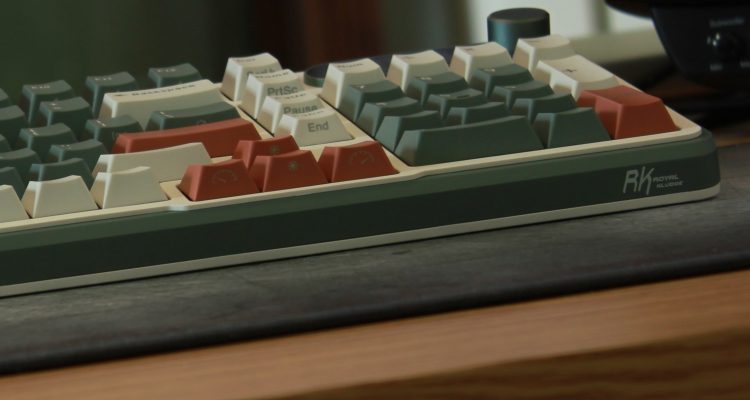
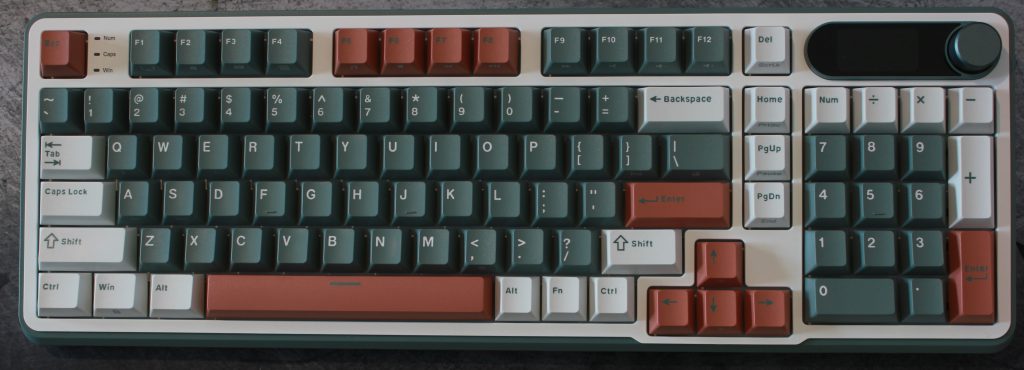
The Royal Kludge S98 is a compact 98% mechanical keyboard that combines wireless connectivity, a built-in display, a volume knob, hot-swappable switches, and a feature set that aims to deliver a premium experience without a premium price tag.
For this review, I spent time using the Royal Kludge S98 in Black with Creamy Linear switches for gaming, productivity work, general typing, and daily desktop use. I also used several keyboard testing tools to examine input behavior, rollover performance, and typing consistency.
The exact configuration tested can be found on the official Royal Kludge product page and using this link will get you 10% off:
Interested in the Royal Kludge S98?
Save 10% when you purchase directly from RK Gaming.
Affiliate link — I may earn a commission from qualifying purchases at no additional cost to you.
Rather than focusing solely on specifications, this review looks at how the S98 performs in real-world use and whether its features translate into a better everyday experience.
Test Environment
Testing included:
- Keyboard Inspector
- Keyboard Tester Pro
- Monkeytype
- Gaming sessions
- Daily typing and productivity use
The S98 was tested in both wired and wireless modes where applicable.
Tools Used
Keyboard Inspector
https://github.com/mat1jaczyyy/Keyboard-Inspector
Keyboard Tester Pro
https://keyboardtester.click/tools/keyboard-tester/
Monkeytype
https://monkeytype.com/
First Impressions
The first thing I noticed was the build quality.
The S98 feels solid and well constructed. It has a reassuring weight, a clean design, and a small display integrated into the keyboard. The volume knob is also well implemented and feels satisfying to use.
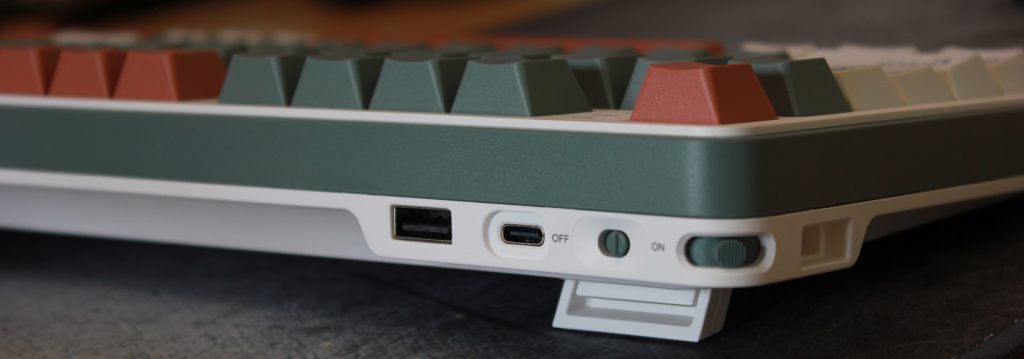
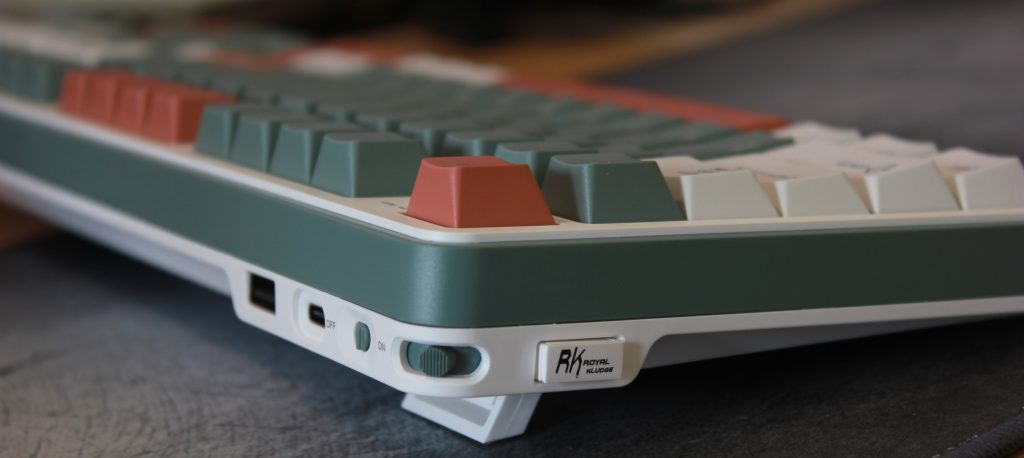
One small feature that immediately stood out was the magnetic USB receiver storage. It sounds minor on paper, but it’s one of those details that makes the product feel well thought out.
The keyboard supports wired, 2.4 GHz wireless, and Bluetooth connectivity, giving users plenty of flexibility regardless of their setup.
Display Customization
One feature I initially struggled to find was display customization. At first glance, it wasn’t immediately obvious how to upload custom animations or GIFs to the keyboard’s built-in screen.
Royal Kludge provides two ways to configure the S98:
- Download the RK software from https://rkgamingstore.com/pages/software
- Use the browser-based configuration tool at https://drive.rkgaming.com/
The web-based option was the biggest surprise for me. After connecting the keyboard via USB, I simply clicked Select Device and was able to access the keyboard configuration without installing any software.
I consider this a significant advantage. In the past, I have encountered situations where configuration software from the same manufacturer conflicted with software for other devices. Being able to configure the keyboard through a browser eliminates that concern entirely and makes setup considerably more convenient.
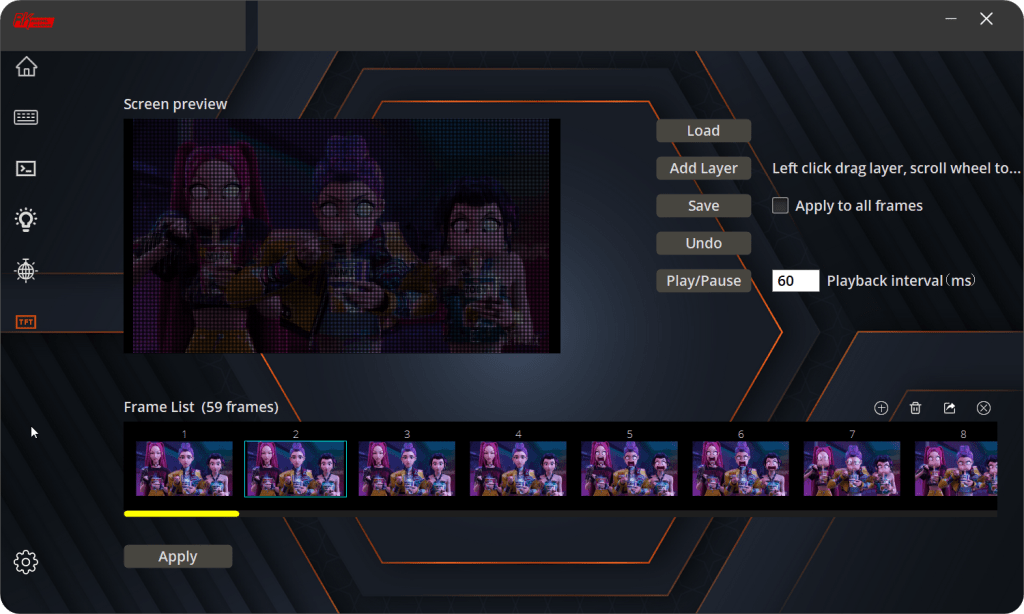
Custom GIFs are uploaded through the TFT section of either the desktop software or the web-based configuration tool. The display supports GIFs up to 320 x 172 pixels and under 2 MB in size. During testing, I successfully uploaded a 305 x 172 GIF that was approximately 1.88 MB in size.
If your GIF exceeds those limitations, tools such as https://www.iloveimg.com/ can quickly resize or compress the animation to fit within the supported requirements.
What surprised me most was the TFT editor itself. Initially, I assumed it was simply a tool for uploading GIFs, but it appears to be far more capable. In addition to loading existing GIFs, the editor allows users to import multiple images and create their own frame-by-frame animations directly within the software. The interface also includes layer controls and frame management options that provide a surprising amount of customization for a keyboard display.
The only downside I encountered was transfer speed. Uploading my test animation took roughly 15 minutes to complete. It worked reliably, but the process was slower than I expected.
Once configured, the display adds a surprising amount of personality to the keyboard and helps separate the S98 from many competing mechanical keyboards in the same price range.
Keyboard Inspector Testing
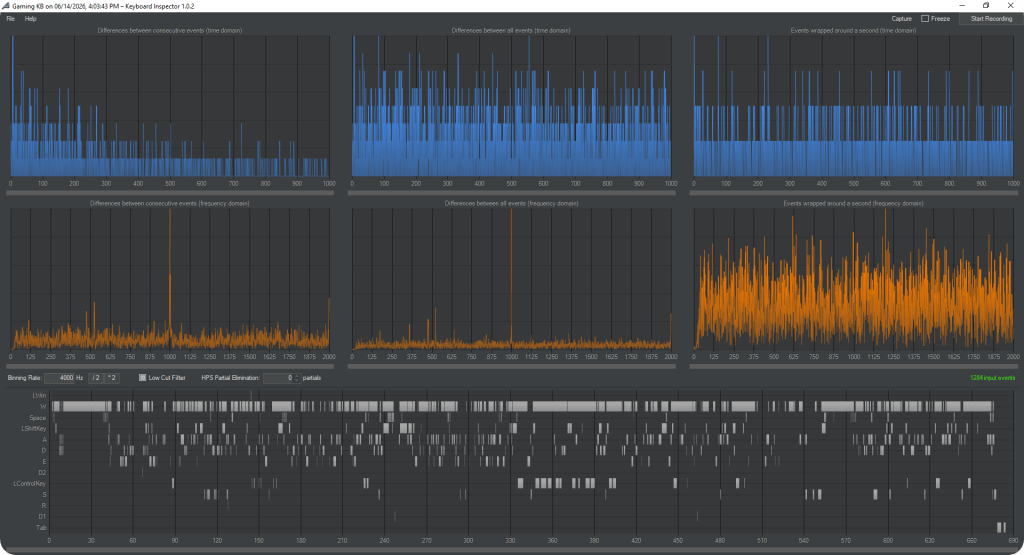
Keyboard Inspector was used to examine event timing behavior and input consistency while gaming.
Royal Kludge S98 Wired Results
The S98 produced strong frequency-domain peaks near the 500 Hz and 1000 Hz ranges during testing.
No input anomalies were observed, and key presses remained consistent throughout testing.
Royal Kludge S98 Wireless Results
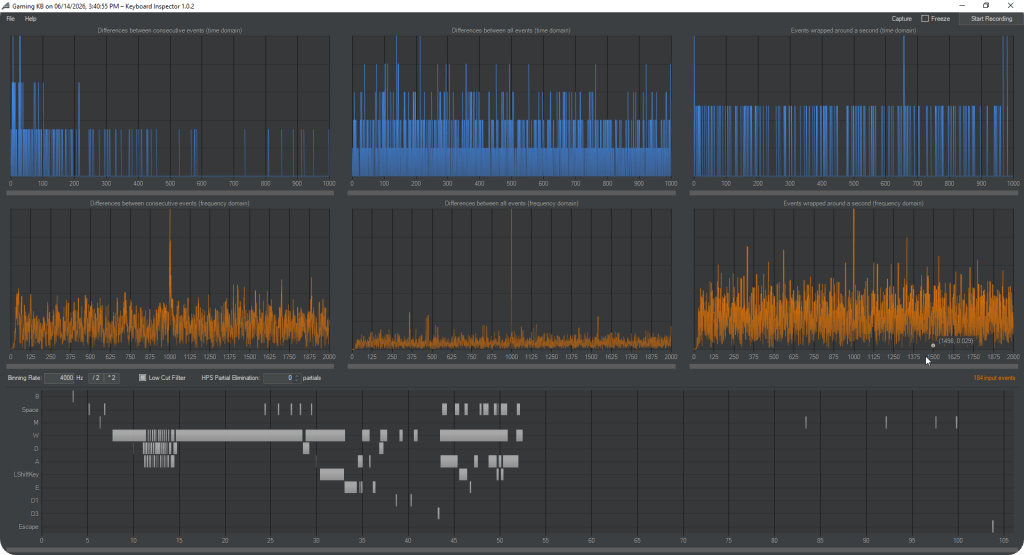
The S98 was also tested using its wireless connection.
The wireless capture showed behavior very similar to the wired tests, with dominant peaks near the 1000 Hz range and no obvious instability during gameplay.
No noticeable latency, missed inputs, or connection issues were observed while gaming.
Keyboard Inspector Summary
Based on the collected captures:
- Dominant activity appeared near the 500 Hz and 1000 Hz ranges.
- Wired and wireless results appeared very similar.
- No key chatter or input instability was observed.
These results should not be interpreted as official polling-rate measurements, but they do suggest responsive and consistent input behavior in both wired and wireless operation.
Keyboard Tester Pro – Rollover and Anti-Ghosting
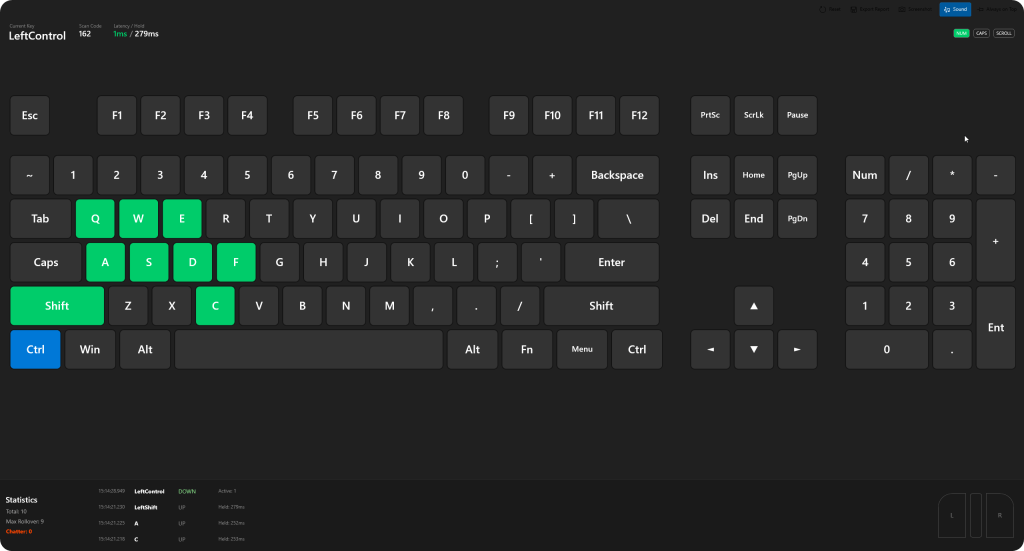
Keyboard Tester Pro was used to verify simultaneous key registration and check for chatter.
Royal Kludge S98
The S98 successfully registered all tested gaming key combinations and reported:
- Max Rollover: 9
- Chatter: 0
Keyboard Tester Pro Summary
The S98 performed well during anti-ghosting testing.
No chatter was detected, and the keyboard handled multiple simultaneous key presses without dropped inputs during testing.
The overall result was exactly what I would expect from a modern gaming-focused mechanical keyboard.
Monkeytype Typing Test
Royal Kludge S98
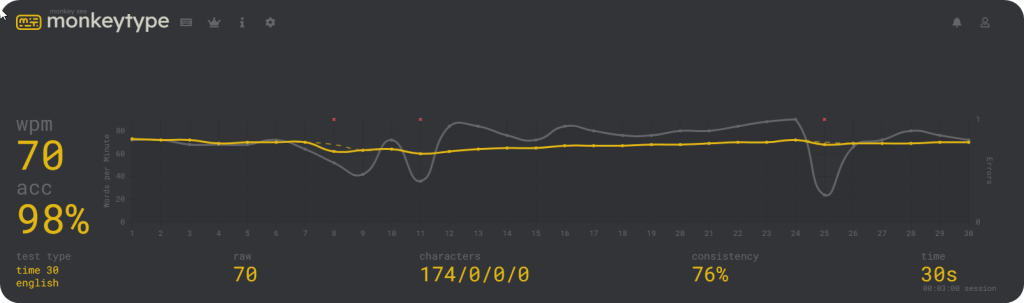
Results:
- WPM: 70
- Accuracy: 98%
- Raw WPM: 70
- Consistency: 76%
Monkeytype Summary
The typing results were excellent, producing strong speed and accuracy scores during testing.
As with any typing benchmark, individual results will vary based on familiarity, typing habits, and practice. The numbers should be viewed as a snapshot of performance rather than a definitive measurement of the keyboard itself.
What stood out more than the raw numbers was how comfortable and natural the keyboard felt during extended typing sessions.
Daily Use Experience
This is where the Royal Kludge S98 made its strongest impression.
The keyboard feels modern, well-built, and thoughtfully designed. The chassis has a reassuring weight, the volume knob feels excellent, and the small integrated display adds a unique touch without feeling gimmicky.
Wireless performance was reliable throughout testing, and switching between wired and wireless operation was straightforward. The magnetic storage location for the USB receiver is also a small but appreciated quality-of-life feature.
The 98% layout strikes an interesting balance. It retains most of the functionality of a full-size keyboard while reducing the overall footprint on the desk. Users coming from traditional full-size keyboards may notice the more compact arrangement at first, but the adjustment period is relatively short.
For productivity work, development tasks, web browsing, and general desktop use, the S98 remained comfortable throughout extended sessions. The keyboard never felt distracting, and its layout quickly became familiar.
Overall, the S98 delivers a polished experience that feels more premium than its price point would suggest.
Switches and Sound
The Royal Kludge S98 tested here uses Linear Cream switches.
If you’ve used linear switches before, the overall feel will be familiar. There is no tactile bump during key travel, allowing each keystroke to move smoothly from top to bottom.
What stood out to me was how smooth the switches felt in practice. The best way I can describe them is tight but smooth. The keys feel stable and controlled without feeling scratchy or loose, resulting in a typing experience that feels refined and consistent.
The switches also produce a pleasant sound profile. While many linear switches are often compared to traditional red switches, I found the Linear Cream to have a smoother feel and a more polished overall typing experience than many entry-level linear switches I’ve used in the past.
That said, switch preference is highly subjective.
Personally, I tend to prefer tactile brown switches and the deeper sound profile they often provide. The Linear Cream switches offer a smoother keypress and a slightly higher-pitched sound signature that many users may prefer.
This is not a criticism of the keyboard. It’s simply a matter of personal preference.
Gaming Experience
During gaming sessions, the S98 performed flawlessly.
I did not encounter:
- Missed inputs
- Disconnects
- Noticeable latency
- Wireless stability issues
The keyboard simply disappeared into the background, which is exactly what I want from a gaming peripheral.
While Keyboard Inspector suggested strong event-reporting performance, I cannot honestly say that I noticed a dramatic difference compared to other quality keyboards during actual gameplay.
I noticed a keyboard that remained responsive, reliable, and consistent throughout testing.
What I Liked
- Premium build quality
- Excellent typing feel
- Wired, wireless, and Bluetooth support
- Magnetic USB receiver storage
- Responsive performance
- Attractive design
- Built-in display
- Volume knob
- Browser-based configuration through RK Drive Extensive display customization including custom
- GIFs and frame-by-frame animations
What I Didn’t Like
- The 98% layout may require an adjustment period for users accustomed to full-size keyboards
- I personally prefer tactile switches over the included linear switches
Final Thoughts
The Royal Kludge S98 delivers an impressive combination of features, build quality, and versatility.
Its premium construction, excellent typing experience, multiple connectivity options, integrated display, and responsive performance make it feel like a keyboard that belongs in a higher price category.
Throughout testing, the S98 performed reliably in both gaming and productivity workloads. Input behavior was consistent, wireless operation was stable, and the keyboard proved comfortable during extended use.
No product is perfect, and some users may prefer a traditional full-size layout or different switch types. However, those considerations come down largely to personal preference rather than shortcomings of the keyboard itself.
For anyone looking for a feature-rich mechanical keyboard with strong wireless support and a modern design, the Royal Kludge S98 is easy to recommend.
It succeeds at what it sets out to do: deliver a premium keyboard experience without demanding a premium price.
Interested in the Royal Kludge S98?
Save 10% when you purchase directly from RK Gaming.
Affiliate link — I may earn a commission from qualifying purchases at no additional cost to you.


No Comments on "Royal Kludge S98 Review"